

Keeping your Aadhaar card address updated is essential for accessing government services, banking facilities, LPG connections, PAN linkage, passport verification, and countless other official processes. When you move to a new home, your Aadhaar address must reflect the change to avoid service delays and documentation issues. Fortunately, the UIDAI (Unique Identification Authority of India) allows citizens to update their address online quickly without visiting an Aadhaar Enrollment Center. In this complete guide, we explain how to update address in the Aadhaar card online, the documents required, eligibility conditions, common errors, status tracking, and important tips to ensure a smooth update process.
Why It Is Important to Update the Address in the Aadhaar Card
An outdated Aadhaar address can lead to:
- Rejection during KYC verification
- Delays in banking and financial services
- Issues in passport and PAN card processing
- Problems in receiving government benefits and subsidies
- Mismatch during mobile number verification
We must ensure that the address mentioned in Aadhaar matches our current residential address to maintain seamless documentation.
Eligibility for Online Aadhaar Address Update
We can update our Aadhaar address online if:
- Our mobile number is linked with Aadhaar
- We have valid address proof documents
- We have access to OTP authentication on the registered mobile number
If the mobile number is not linked, we must visit the nearest Aadhaar center for the update.
Documents Required for Aadhaar Address Update
UIDAI accepts a wide range of valid address proof documents. Some of the most commonly used documents include:
- Passport
- Bank statement or passbook
- Post office account statement
- Ration card
- Voter ID
- Driver’s license
- Electricity bill (not older than 3 months)
- Water bill (not older than 3 months)
- Gas connection bill (not older than 3 months)
- Rent agreement (registered)
- Insurance policy
- Registered sale deed
The document must clearly show your name and new address.
Step-by-Step Process to Update Address in Aadhaar Card Online
We can complete the entire Aadhaar address update process online through the official UIDAI portal.
Step 1: Visit the Official UIDAI Website

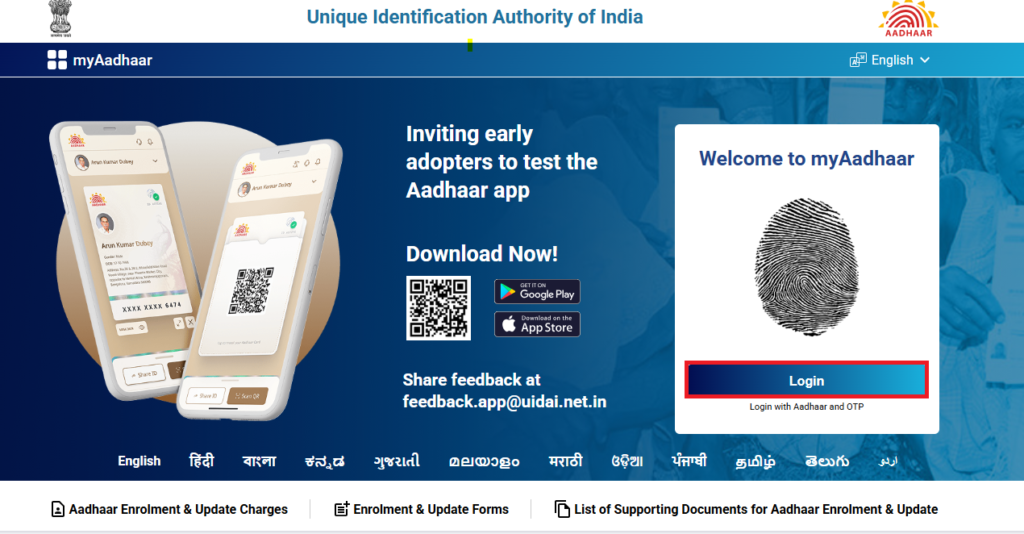
Go to the official UIDAI self-service update portal:
https://myaadhaar.uidai.gov.in
Click on “Login”.
Step 2: Enter Aadhaar Number and OTP

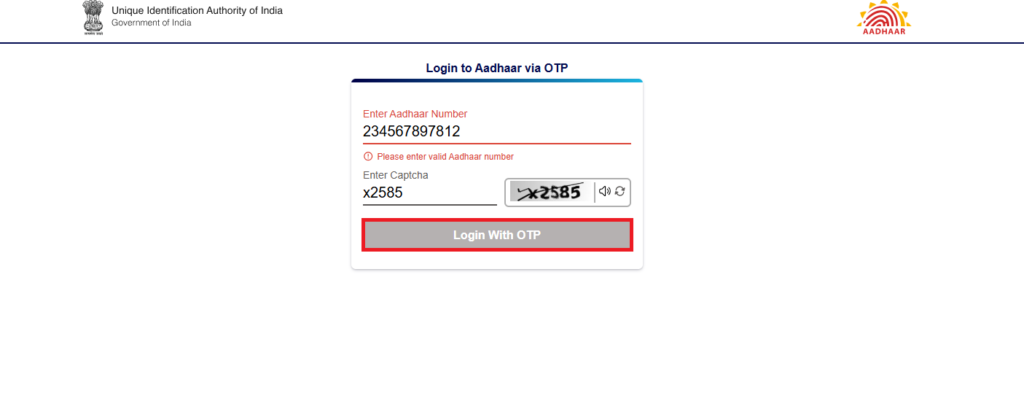
- Enter your 12-digit Aadhaar number
- Enter the captcha code
- Click Send OTP
- Enter the OTP received on your registered mobile number
Step 3: Select Address Update Option

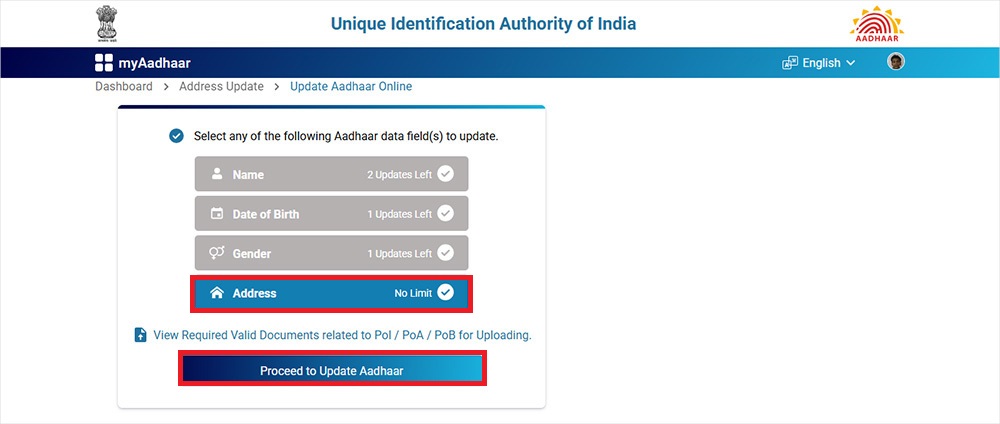
After logging in:
- Click on “Update Aadhaar Online.”
- Choose “Address” from the list of update options
Step 4: Enter the New Address Details
Carefully fill in:
- House number / Flat number
- Street / Area / Locality
- Landmark
- Village / Town / City
- District
- State
- PIN code
Ensure there are no spelling mistakes and that the address matches the document proof exactly.
Step 5: Upload Valid Address Proof
- Upload the scanned copy of the address proof document
- Ensure the file is clear, readable, and in JPEG, PNG, or PDF format
- The file size should be within the allowed limit
Step 6: Preview and Submit
- Review the entered details carefully
- Submit the request
- Note down the Upgrade Request Number for tracking
Step 7: Pay the Update Fee
We must pay a nominal fee of ₹50 online using:
- Debit card
- Credit card
- Net banking
- UPI
After payment, the request is successfully submitted.
How to Check Aadhaar Address Update Status
We can track the status using the URN:
- Visit myaadhaar.uidai.gov.in
- Click on “Check Update Status.”
- Enter the URN number
- View the current status of the request
The update process generally takes 3 to 10 working days.
Important Tips for Successful Aadhaar Address Update
To avoid rejection, we must follow these best practices:
- Upload a clear and readable document
- Ensure the name on the document matches Aadhaar
- Avoid abbreviations in address fields
- Double-check spellings before submission
- Use documents not older than 3 months (for utility bills)
- Ensure the mobile number is active for OTP
Common Reasons for Aadhaar Address Update Rejection
UIDAI may reject the request due to:
- Blurry or unreadable document upload
- Mismatch in the name between Aadhaar and the proof
- Invalid document type
- Incomplete address information
- Incorrect PIN code
- Expired or outdated utility bill
If rejected, we can correct the errors and reapply.
Updating Aadhaar Address Without Documents
If we do not have valid address proof, UIDAI allows updating the address using an Address Validation Letter:
- Request for Address Validation Letter from the UIDAI portal
- Enter the Aadhaar number of the address verifier
- The verifier receives the OTP and approves
- We received the validation letter
- Use this letter to update the address
This method is useful for tenants, students, and individuals staying with relatives.
How to Download an Updated Aadhaar Card After Address Change
Once the update is approved:
- Visit the UIDAI website
- Click on Download Aadhaar
- Enter Aadhaar number and OTP
- Download the updated e-Aadhaar PDF
This e-Aadhaar is equally valid as the physical card.
Benefits of Updating Aadhaar Address Online
Updating address online provides:
- Convenience without visiting the Aadhaar center
- Quick processing
- Secure document upload
- Real-time status tracking
- Minimal service charge
- Paperless process
Conclusion
Updating the address in the Aadhaar card online is a simple, fast, and secure process when we follow the correct steps and upload valid documents. By ensuring accuracy in details and document clarity, we can complete the update without any rejection. Keeping Aadhaar information current helps us avoid unnecessary complications in banking, government services, and identity verification.